TL;DR
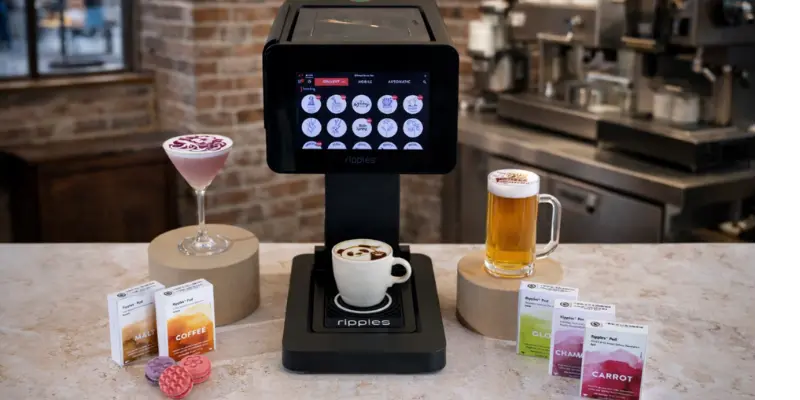
A drink printer machine (also known as a coffee printer) is a compact beverage-top printer that sits on your bar or coffee counter and prints edible designs directly onto foam-topped drinks and even desserts.
The Ripple Maker latte printer, for example, uses natural, plant-based color extracts to print designs, “inks” (Ripples Pods) to print logos, selfies, and messages on coffee, cocktails, beer, milkshakes, and macarons in about 10 seconds per drink. The pods are optimized for different drink types, are certified to comply with international food safety regulations, and are gluten-free, non-GMO, and allergen-friendly.
What Is a Drink Printer Machine & How Does It Work?
If you’ve ever seen a latte, beer, or a cocktail with a perfect logo or selfie printed on the foam, that was almost certainly done by a drink printer machine. Ripples defines the Ripple Maker as a drink printer (Coffee printer) designed for all foam-topped drinks and some desserts, like macarons, printing images on top of foam using plant-based extracts.
Instead of ink and paper, this category uses:
- A countertop printer with an intelligent tray
- Edible “ink” cartridges called Ripples Pods
- A content platform that feeds designs to the machine
Together, they let you turn every drink into a small, branded media placement that guests will photograph, post, and remember.
Coffee Printer vs. Beverage Printer:
What Is the Difference?
If you’ve been researching drink printers, you’ve probably seen the terms coffee printer, coffee printer machine, coffee printing machine, and beverage printer used interchangeably. While they’re closely related, there is a subtle difference.
A coffee printer is typically associated with printing edible designs on coffee drinks such as lattes, cappuccinos, and flat whites. A beverage printer is a broader term that includes machines capable of printing on coffee, beer, cocktails, milkshakes, and other foam-topped drinks.
The Ripple Maker printer fits both categories. It is designed to print logos, photos, messages, and artwork across multiple beverage types, making it a versatile solution for cafés, restaurants, hotels, bars, and event businesses.
Whether you’re searching for a coffee printer or a beverage printer, the most important question isn’t the name – it’s whether the machine fits your menu, workflow, and guest experience goals.
How does a drinking printer machine work to create edible designs?
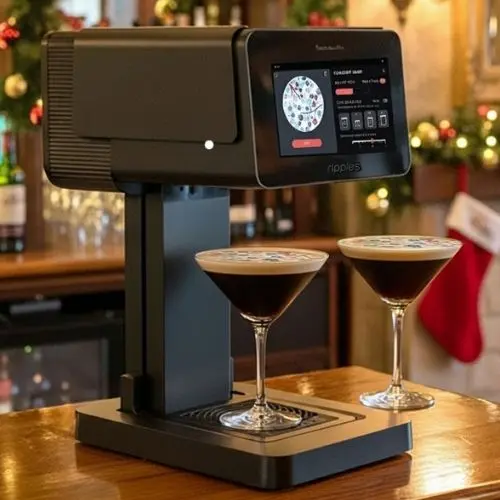
A drinking printer machine is effectively a beverage-top media printer. In the Ripple Maker’s case, it is a compact device that fits on a standard counter, plugs into a normal outlet, and prints high-resolution images on the foam surface of drinks using natural, plant-based color extracts.
Under the hood, three components work together:
- Hardware
The printer includes a self-rising tray and sensors that automatically detect cup diameter and height to ensure the design is sized and centered correctly, even when your glassware changes. - Edible “ink” (Ripples Pods)
Ripple Pods are cartridges filled with patented edible extracts optimized to print on a variety of foams. They are available in different bases and colors (coffee, malt, black carrot, cabbage-based Chameleon, UV-reactive Glow, and multi-pod blends), so you can match designs to drink types and campaigns. - Content & software
Through Ripples Cloud and the Design Plan, you access thousands of royalty-free designs, upload your own logos, and even give guests a WebApp with a QR code so they can send selfies or messages from their phones straight to the machine’s queue.
From design to drink: the workflow
So what are the steps to print on a drink? In a typical use case:
- Prepare the drink.
You make a coffee, latte, cappuccino, flat white, beer, cocktail, milkshake, or even a cookie or macaron, ensuring it has a smooth foam or frosting surface and fits within the recommended cup size. - Select the design.
Staff can choose from the on-screen library or pull designs sent by guests through the WebApp (for example, selfies or custom messages). - Place and print.
You place the cup or glass on the tray, the sensors align the print area, and the Ripple Maker sprays a precise amount of edible extract onto the foam surface, creating the final “ripple” design.
Nothing about the drink’s recipe needs to change. You’re simply adding a digital layer on top of the foam that carries your branding, seasonal content, or customer-generated designs.
How do drinking printer machines handle different beverage types and textures?
The core rule is simple: if you can create a stable, light-colored surface, you can probably print on it.
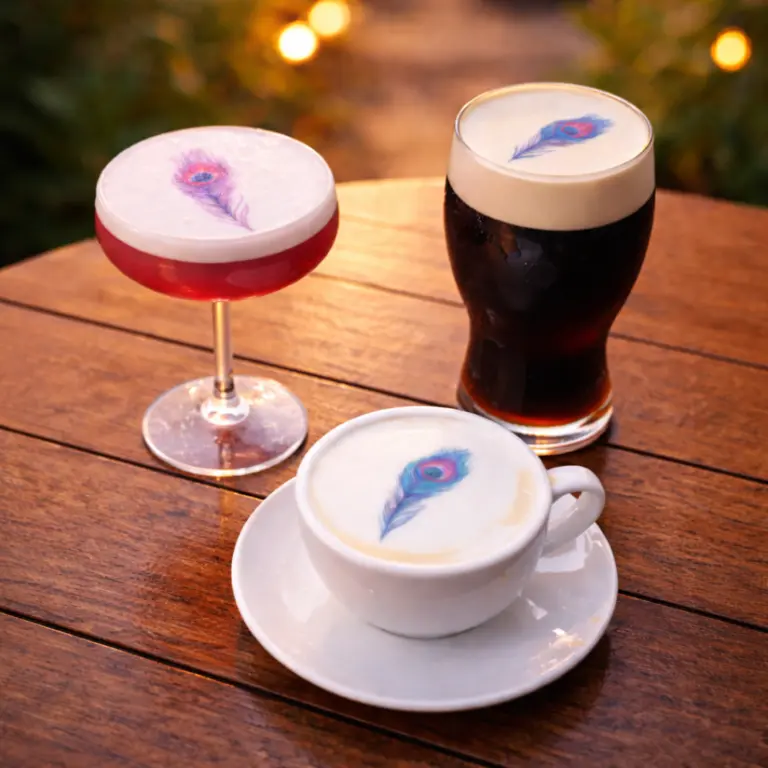
Ripples breaks this into several “What can I print on?” categories: coffee, beer, cocktails, milkshakes, and desserts such as macarons.
Coffee & hot drinks
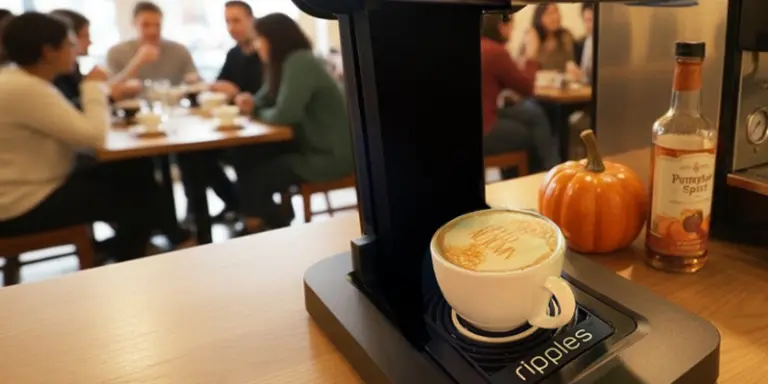
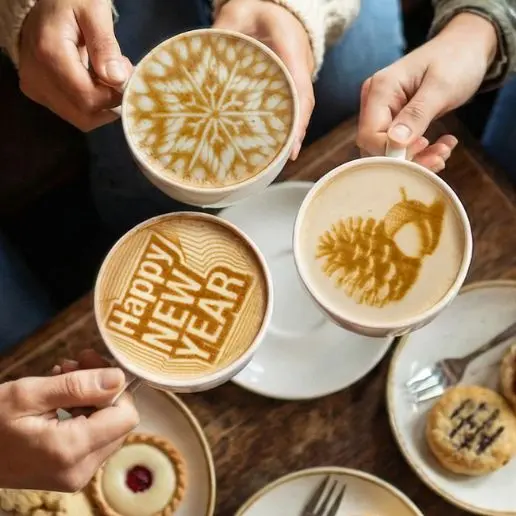
Coffee is where the platform started: coffee-extract-topped lattes became an instant classic for Ripples. Best practice is to pour smooth microfoam and leave a flat, pale foam “target” in the center of the cup. The Brown Coffee Pod uses coffee extract to create brown prints that look like latte art and are designed for coffee and hot cocoa.
Beer
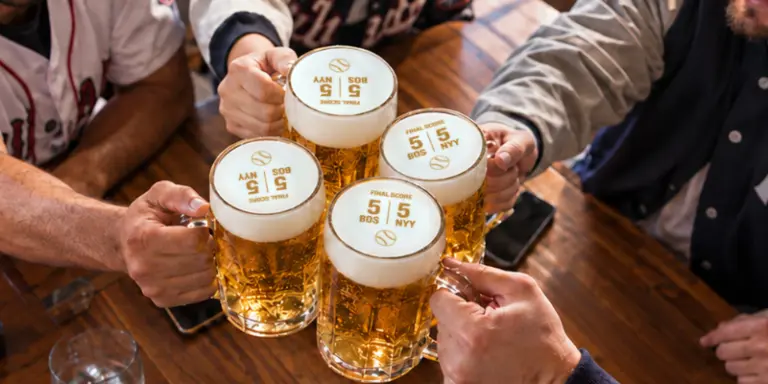
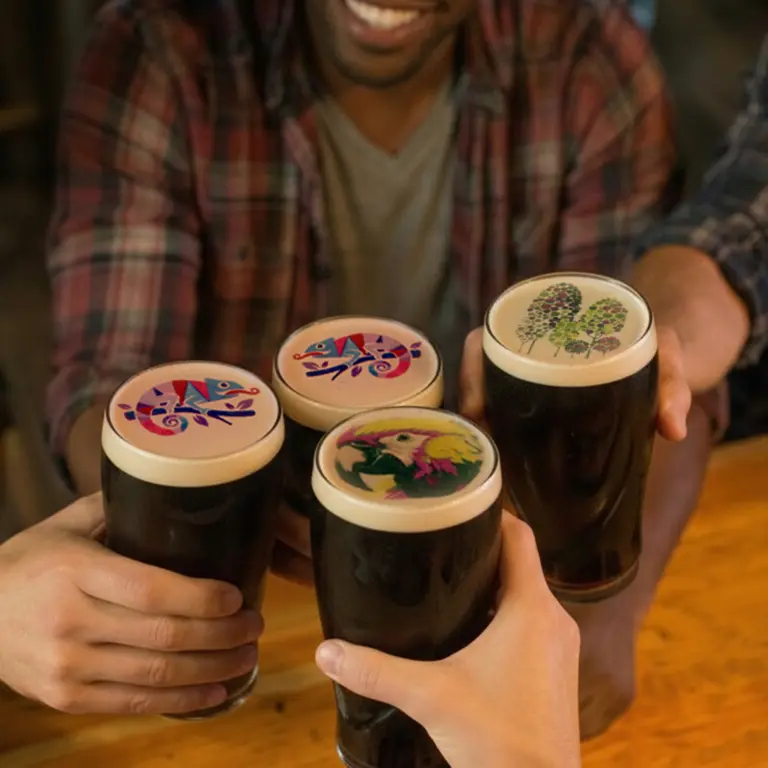
For beer, the natural head becomes your canvas. Ripples describes printing images, logos, or fun messages directly on beer foam to create unique, shareable moments that enhance guest experiences and build brand loyalty. The malt-based pod is odorless and flavor-neutral, and is specifically positioned as suitable for beer and other drinks.
Cocktails & mocktails
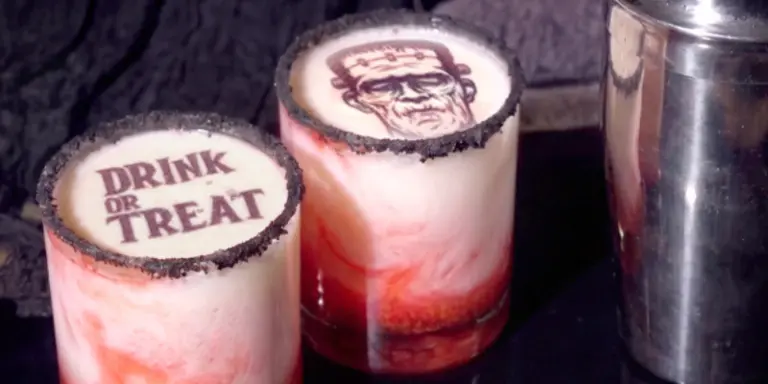
Cocktail printing depends on having consistent foam on top of the drink. Ripples promotes both traditional egg-white / aquafaba approaches and its own Ripples Foamer, a vegan foaming concentrate that produces stable, neutral-tasting foam for shaken cocktails and mocktails. That foam becomes the surface for prints, enabling personalized cocktails without changing recipes or flavor profiles.
Desserts & macarons
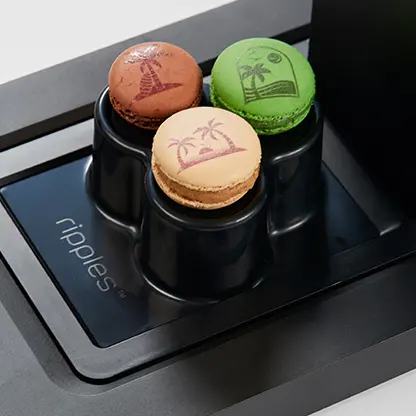
The same printer can be used on macarons and other desserts with smooth frosting or icing. Ripples highlights macaron printing as a way to add personalized touches for gifts, events, and launches.
Across all these formats, the support content for “Master Printing” emphasizes:
- Stable, even foam or coating
- Cups not wider than the recommended diameter
- Filled to the brim to keep the print crisp and centered
This is what lets a single drinking printer machine move seamlessly from cappuccinos in the morning to cocktails and beer at night.
Commercial Coffee Printer Applications
If you own a café, restaurant, hotel, bar, or catering business, you’re probably not looking for a machine that simply decorates drinks. You’re looking for a way to create memorable guest experiences, strengthen your brand, and stand out from competitors. That’s exactly where a commercial coffee printer comes in.
If you’re wondering what machine prints logos on coffee or which machines can print custom images on coffee, the answer is the Ripple Maker printer. These machines print edible logos, photos, artwork, messages, and personalized messages directly onto drink foam using food-safe, plant-based extracts.
The Ripple Maker coffee printer is designed specifically for hospitality businesses. Instead of serving only one purpose, it can support multiple parts of your business throughout the day.
You can use it to:
- Brand every latte with your café or hotel logo using a logo printer.
- Personalize drinks with guest names, birthdays, anniversaries, and welcome messages using a personalized coffee printer.
- Create seasonal menus with holiday artwork and limited-time promotions.
- Print sponsor logos and event branding during corporate events.
- Encourage guests to share photo-worthy drinks on social media.
- Promote loyalty programs or QR codes directly on the foam.
Unlike traditional latte art, a custom coffee printer delivers the same professional result every time, regardless of who is making the drink. That consistency makes it an effective branding and marketing tool as well as a memorable part of your guest experience.
How long does it take to print a design with a drinking printer machine?
Speed is critical in any bar or café, so print time is one of the most important operational questions.
Ripples positions the Ripple Maker II and Ripple Maker II Pro as printing in about 10 seconds per drink. Product specs for both models highlight that the machines “print in 10 seconds,” combining high throughput with compact, plug-and-play design. The main site also promotes “stunning drink prints in seconds” and notes that the printer fits seamlessly on the counter and requires minimal staff training.
In practical terms:
- The drink preparation time (pulling a shot, steaming milk, shaking a cocktail, or pouring beer) is what you already do today.
- The print pass is roughly 10 seconds. While the machine prints, staff can start the next drink or interact with guests, so the printer does not disrupt service flow. Case studies from venues like The Yeatman call out that the Ripple Maker “operates with just one tap and prints in seconds,” and does not hinder operations.
For high-volume operations, that makes it realistic to print on every eligible drink instead of treating it as a rare add-on.
Coffee Printer vs. Latte Art Machine:
What’s the Difference?
Although they’re often compared, a coffee printer and a latte art machine serve very different purposes.
A latte art machine helps create decorative milk foam or assists with pouring patterns such as hearts and rosettes. It’s focused on the foam itself.
A latte printer, or coffee art machine, prints edible images directly onto finished foam. Instead of producing traditional latte art, it can reproduce logos, photos, illustrations, messages, and personalized messages with consistent precision.
If your goal is to create branded drinks, personalized guest experiences, or marketing campaigns, a coffee printer offers significantly more flexibility than a traditional latte art machine while fitting naturally into your existing workflow.
Are drinking printer machines safe and FDA-approved?
With any food-contact technology, safety and compliance come down to ingredients and manufacturing standards rather than the hardware alone.
For Ripples, the key elements are pods and foamer:
- Ripple Pods are described as cartridges filled with patented extract, optimized for foams, and made from natural ingredients.
- All pods are “safety certified to comply with international regulations,” and the pods’ FAQ explains that they are tested, regulated, and certified against leading global food safety standards such as HACCP and ISO-based systems for food safety management.
- Pod extracts are explicitly stated to be gluten-free, non-GMO, 100% vegan, kosher, and free of common allergens, including dairy, soy, and nuts.
On top of that, the Chameleon Pod article notes that this pod is developed and produced in Ripples’ own food tech lab and factory, and meets full global safety regulations, including FDA and GMP certifications.
For the foam layer, Ripples Foamer is produced in a GMP-certified food lab, is vegan, kosher, gluten-free, non-GMO, and made without soy or nuts.
Finally, Ripples is clear that adding these extracts does not affect the drink’s taste; the coffee-based extract has a subtle coffee aroma, and the malt-based extract is odorless and tasteless, while other color pods are formulated to be neutral in smell and flavor.
So when you use a Ripple Maker with official pods and a foamer, you are working with components engineered specifically for food and beverage use and backed by documented safety certifications, including FDA coverage for at least part of the pod family.
Can I customize the ink used in drinking printer machines for special beverages?
In a drinking printer machine, “ink” is the edible extract inside the pods, and this is precisely where you get your customization power.
Ripples offers a portfolio of pods that differ by base ingredient and color, including:
Coffee Pod (brown): natural coffee bean extract, ideal for coffee and hot cocoa
- Malt Pod (brown): natural malted barley extract, suitable for all drinks, including beer
- Carrot Pod (red): black carrot extract for bold, red prints
- Chameleon Pod (purple/pink): cabbage-based, pH-sensitive colors that shift with the drink
- Ocean Blend and Jungle Blend: two-pod kits for the Ripple Maker II Pro that generate multi-color print spectra
- Glow Pod: UV-reactive riboflavin extract that glows under black light
All of these pods are designed to be interchangeable on the same device (except certain blends that are Pro-only), so you can swap colors to match specific menus, campaigns, or brand assets.
The Ripple Maker II Pro goes a step further by holding two cartridges at once and supporting one-color, two-color, and multi-color printing, including pH-based color-change effects. That means you can, for example:
- Use a coffee pod for morning latte art
- Switch to malt + Chameleon for evening cocktails and beer
- Deploy Glow for UV-party menus
In practice, you’re not formulating your own ink. Instead, you’re building a palette of safe, food-grade color extracts and assigning them to drinks and campaigns through the content and pod configuration you choose.
Wondering if a drink printer is worth the investment? Now that you know how a drinking printer machine works, you can learn how hospitality businesses use the Ripple Maker to increase guest engagement, strengthen their brand, and create new revenue opportunities in our guide: Why the Ripple Maker Drink Printer Is Worth the Investment for Your Business.
What Should I Look for When Buying a Coffee Printer?
If you’re comparing different coffee printers for your business, it’s easy to focus on the purchase price. But, in reality, the best commercial coffee printer is the one that helps you operate efficiently while creating experiences your guests will remember and share.
When evaluating a coffee printer, consider more than just the hardware. Ask yourself:
- Does it produce high-quality prints consistently?
- Does it use natural, food-safe ingredients that won’t stain guests’ tongues or affect the taste of the drink?
- Is it fast enough for busy service?
- Can staff learn to use it quickly?
- Does it offer software for managing designs and promotions?
- Can guests upload their own photos or messages?
- Is technical support available if you need help?
- Are edible printing supplies readily available?
If you’re wondering what is the best coffee printer for a café or which coffee printer works best for commercial use, the answer depends on your business goals. For most hospitality businesses, the best solution is one that integrates seamlessly into daily service while helping you increase guest engagement, strengthen your brand, and create new marketing opportunities.
How Much Does a Commercial Coffee Printer Cost?
One of the first questions hospitality businesses ask is: “How much does a commercial coffee printer cost?”
Pricing varies depending on the machine’s capabilities, print quality, software, support, and commercial features. While entry-level devices may appear less expensive, commercial businesses should evaluate the complete solution rather than the hardware alone.
When comparing machines, consider factors such as print speed, image quality, guest personalization features, software, onboarding, customer support, and the ongoing availability of edible printing supplies. A machine that integrates smoothly into your workflow and helps you attract repeat business often delivers greater long-term value than one chosen based on price alone.
What Does It Cost to Print One Drink?
The purchase price is only part of the investment. As a hospitality business owner, you’ll also want to understand the ongoing cost per printed drink.
With the Ripple Maker, the total cost per printed drink includes both the machine and the edible printing pods.
The primary ongoing operating cost comes from the Ripples Pods, which typically produce approximately 1,200 to 1,600 prints each, depending on the design’s size and ink coverage.
How quickly you’ll recover your investment depends on your business.
Some venues choose to charge a premium for personalized drinks, while others use printed drinks to attract new customers, increase repeat visits, support branded events, or generate social media exposure. In many cases, the added revenue and marketing value can help offset the investment much faster than the printing cost alone.
To learn more about how businesses calculate the return on investment (ROI) of a drink printer, read our article Why the Ripple Maker Drink Printer Is Worth the Investment for Your Business.
FAQ: Drinking Printer Machines
1. Is a drinking printer machine only for coffee, or can it work with other drinks?
While latte art is where many people first encounter drink printing, the Ripple Maker is explicitly designed for coffee, beer, cocktails, milkshakes, and desserts like macarons. Any foam-topped or frosting-topped item with a stable surface can serve as a canvas, so one machine can support multiple dayparts and concepts: breakfast lattes, afternoon milkshakes, and evening cocktails and pints.
2. Do drink prints affect the taste or texture of my beverage?
Ripples emphasizes that its pods are formulated to avoid changing taste or texture. The pods’ FAQ notes that the natural ingredients do not affect the drink’s taste; for example, the coffee-based extract has only a subtle coffee aroma, while the malt extract is completely odorless. Color pods like Carrot, Chameleon, and Glow are also described as odorless and tasteless, so guests see the design without perceiving an extra flavor layer.
3. How difficult is it to train staff to use a drinking printer machine?
The Ripple Maker is positioned as easy to set up and simple to operate, with “plug & play” installation, onscreen design search, automated cup height recognition, and a 1-year support and onboarding session included. Support resources include video guides, master printing tutorials, and maintenance content in the Ripples Academy and support center, which are specifically designed to get teams print-ready quickly. Most venues report that it fits into the existing workflow with just a few minutes of training per staff member.
4. Can guests send selfies or logos from their phones to be printed?
Yes. One of the main engagement features is the Ripples WebApp. You display a unique QR code; guests scan it, which opens a branded mobile site where they can upload a photo, take a selfie, choose a design, or type a short message. When they tap print, their design goes into your Ripple Maker’s queue, and your staff simply match the order number to the drink and hit print. This self-service model creates interactive, “Instagrammable” experiences without slowing the bar down.
5. How many prints can I get from one edible ink pod?
Pod yield depends on pod type, design density, and storage conditions, but Ripples states that pods typically produce roughly 1,200–1,600 prints, with higher coverage designs like selfies using more extract than simple line art. Each pod has an expiration date printed on the box, and for best results they recommend using an opened pod within about 30 days while storing it in a cool, dry place.
6. What kind of safety and dietary assurances can I give my guests?
You can confidently tell guests that Ripples Pods and Foamer are gluten-free, non-GMO, 100% vegan, kosher, and free from common allergens like dairy, soy, and nuts, and that they are produced in certified facilities that follow stringent food safety systems. You can also mention that pods are tested and certified against global food safety standards, and that at least one pod (Chameleon) is specifically described as meeting full global safety regulations, including FDA and GMP certifications.